Requirements and blockers
Where a tender's requirements come from, what each status means, when a requirement blocks, and how to answer for your company.
The Requirements section of a tender page lists the buyer's conditions and where your company stands on each: whether anything rules you out and what still waits for you.
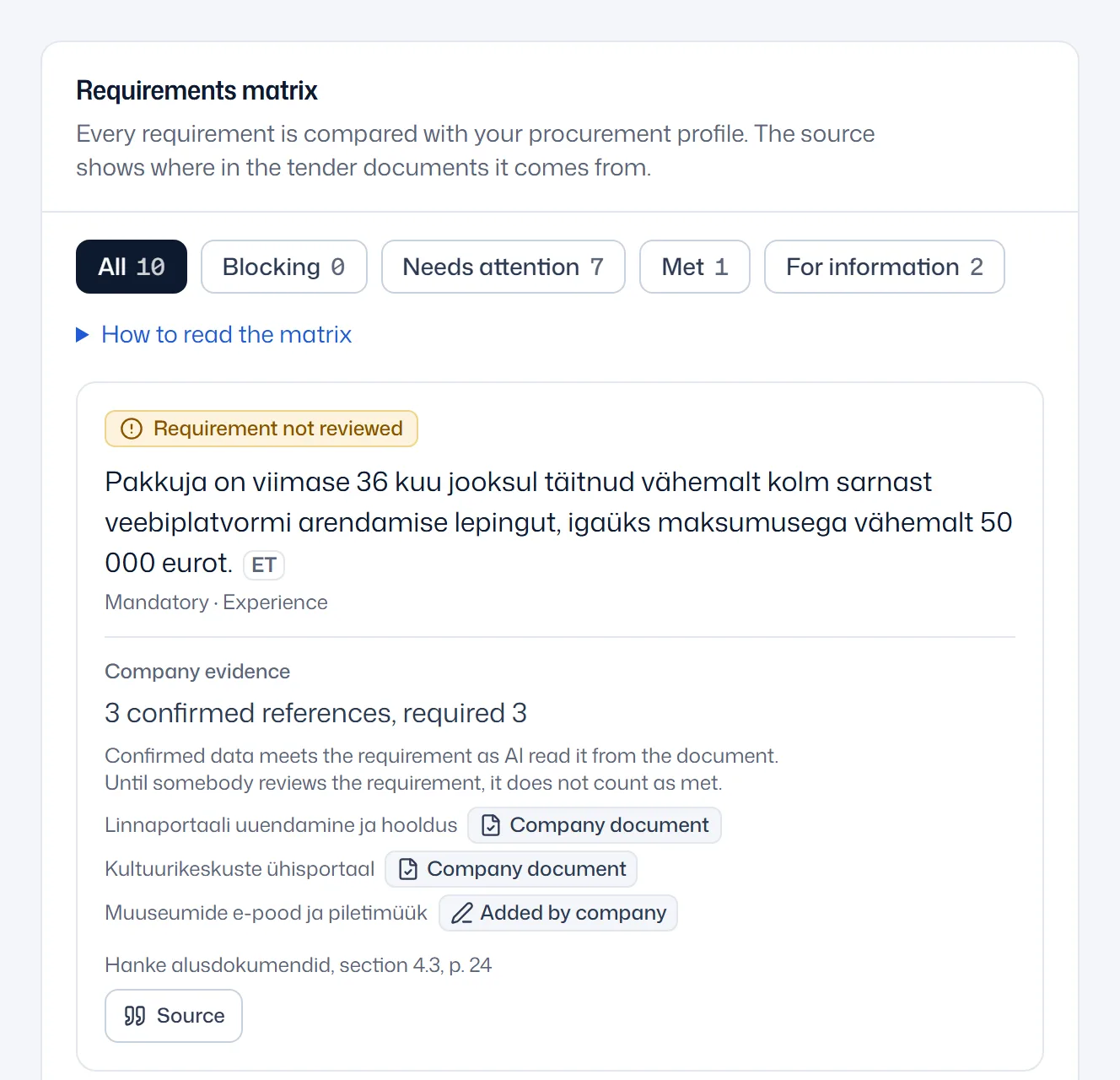
Where requirements come from
- The notice, read by fixed rules without a language model; such requirements are marked From the notice.
- The tender documents you add. Qualification conditions are often there rather than in the notice: download them from the buyer's system and add them under Documents and submission. Where your workspace has document analysis, a language model (AI) reads them, and a requirement is kept only if its quote is found word for word. Where the requirements come from shows how this stands.
Level and status
The level says how much a requirement weighs. Failing a Mandatory requirement excludes the company. A Preferred one does not, but an unmet one is listed with the recommendation. For information is for reading: award criteria, notes and duties under the contract (Contract duty).
The status says what Hankevo knows now:
- Met - confirmed evidence, data from the Business Register, your answer We meet it with its evidence documents, or another route an owner or administrator approved.
- Likely met - evidence exists, but nobody has confirmed it.
- Needs confirmation - Hankevo cannot decide: a person has to judge or confirm the data.
- Not in the profile - the profile holds no evidence, which does not mean the company fails the requirement.
- Requirement not reviewed - a language model read the requirement from a document and nobody has reviewed it. Until then it is neither met nor blocking.
- Missing - confirmed data or your own answer shows the requirement is not met.
- Not applicable - your company marked the requirement as not applying; for a mandatory requirement, an owner or administrator approved it.
Blocking or still open
Blocking marks a mandatory requirement that is known not to be met: confirmed data shows it, or you answered We do not meet it. An empty place in the profile is not a blocker but a question for you. The summary above the list says Qualifies, Qualification needs confirmation, Does not qualify now or Qualification not assessed: see fit and qualification.
Answering a requirement
- Choose the filter Needs attention or Not reviewed to see what waits for a person.
- Press View source beside the requirement. The panel shows the document, the place and the quote; Open the passage in the document's text leads to it in the document's text.
- If the requirement has not been reviewed, choose Confirm, Correct or Not a requirement.
- If Hankevo cannot check the requirement against the profile, answer for the company: We meet it, We do not meet it or Does not apply; for a mandatory requirement the company does not meet as written, also We qualify another way. The answers offered depend on the requirement.
- If the profile lacks evidence you hold, add it from the link beside the requirement.
Owners, administrators and members review and answer; an answer can be taken back.
Claims an owner or administrator approves
Some answers would stop a mandatory requirement counting against the company. Such claims hold only once an owner or administrator of your organization approves them.
- We meet it with evidence, for a mandatory requirement.
- Does not apply. Choose the reason, explain it in at least 20 characters and, where a document or a clarification says so, name the place: section and page, or the clarification's number and date.
- We qualify another way. For a mandatory requirement met in a way the procurement documents allow, such as a subcontractor's capacity, a joint bid or equivalent evidence. Say how you read the requirement and where the documents or the law allow the route, and give the evidence: a company document, a description, or both.
- Not a requirement, and a correction that lowers a mandatory requirement's level or changes its text.
Until a claim is approved, the requirement keeps the status it would have without it, and the qualification is at best Qualification needs confirmation. The requirement's text and quote never change: a correction stands beside them as your organization's reading, and Hankevo compares the quote with your figures.
An owner or administrator presses Approve the claim, or Decline the claim with a reason. Nobody approves their own claim while the organization has another owner or administrator; a sole one does, and the history records it. An approval can be withdrawn with a reason, and a changed claim waits again. Every answer, review and decision stays in the requirement's history.
Last checked October 27, 2026